

Blog
Wie Sie Schlagwörter und Sammlungen zur Organisation von Kunstwerken verwenden
Erfahren Sie, wie Schlagwörter und Sammlungen Besucher beim Suchen und Navigieren in Ihrem Portfolio unterstützen und Suchmaschinen klareren Kontext liefern.
As your portfolio grows, organization becomes part of the visitor experience. A clear structure helps people find related works, move between artworks naturally, and understand the ideas behind your practice.
In Displart, tags and collections serve different purposes. Used together, they can make your portfolio easier to search, easier to browse, and easier for search engines to understand.
Tags describe what is connected to an artwork
Tags can be any word, phrase, theme, place, material, subject, technique, mood, or concept related to an artwork.
For example, a photograph might use tags such as:
- schwarzweiß
- Straßenfotografie
- Istanbul
- Architektur
- Nacht
- analog
- städtische Erinnerung
A painting might use:
- abstrakte Landschaft
- blau
- Migration
- Textur
- Großformat
Tags are useful because they are flexible. They do not need to describe a formal series. They can describe anything that helps connect one artwork to another.
Mediums have their own field
Mediums are related to organization, but they should not be treated as ordinary tags in Displart.
Use the dedicated medium field for the material or process of the artwork, such as:
- Öl auf Leinwand
- Acryl auf Papier
- analoge Fotografie
- Digitaldruck
- Bronze
- Mixed Media
- Video
This keeps material information consistent and easier to display in artwork details. It also avoids mixing technical artwork data with looser descriptive tags.
Tags can still describe ideas around the work, while the medium field describes what the work is made with or how it was produced.
Collections express how you group works conceptually
Collections are more intentional. They are usually about how the artist, photographer, gallery, or studio groups artworks.
A collection might represent:
- a series
- an exhibition body
- a project
- a period of work
- a location-based group
- a conceptual theme
- a group of available works
- a curated selection for a specific audience
If tags are flexible keywords, collections are curated rooms. They tell visitors, "These works belong together for a reason."
Use tags for discovery and search
Tags are especially helpful when visitors search your portfolio.
Someone may not remember a title, but they might search for a place, subject, medium, color, or idea. If your artworks are tagged consistently, those searches become more useful.
Good tags also help you manage your own catalogue. You can find works by theme, material, location, or visual idea without needing to remember every title.
For material-based searches, use the medium field first. Use tags for extra concepts that are not already covered by the artwork's structured fields.
Use collections for navigation
Collections help visitors browse.
Instead of showing every artwork as one long list, you can guide visitors through meaningful groups. This is especially useful when your practice includes different bodies of work.
For example:
- Städte
- Landschaften
- Tierwelt
- Studio-Porträts
- Neuere Arbeiten
- Arbeiten auf Papier
- Verfügbare Drucke
Each collection gives the visitor a focused path through the portfolio.
Some templates include collection pages
Some Displart templates give collections their own public page. In those templates, each collection can appear as a visual entry point with preview images and an artwork count.
The Adrian Demofoto sample portfolio shows this approach: collections are presented as a clear navigation layer before the visitor opens a specific group of works.
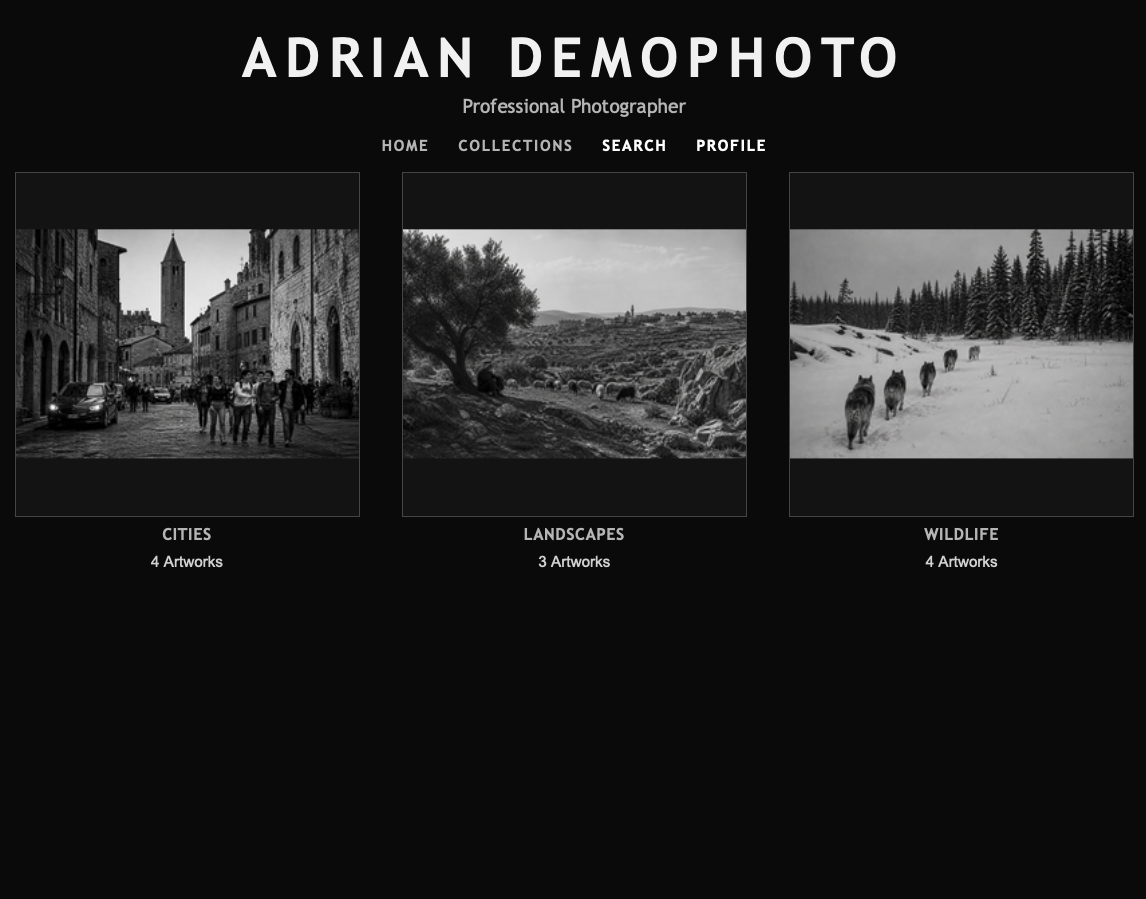
This kind of page is useful when collections are central to the way you want people to experience your work. It turns portfolio structure into visible navigation instead of hiding it behind search controls.
Keep names simple and consistent
Avoid creating several versions of the same idea.
For example, choose one style:
- black and white
- black & white
- monochrome
- B/W
Any of those might be valid, but using all of them creates unnecessary fragmentation. Pick the wording that best matches your audience and use it consistently.
The same applies to collections. If one group is called "Urban Landscapes," avoid also creating "City Landscapes" unless they genuinely mean different things.
Plan first, then refine
Mediums, tags, and collections can be added, removed, and edited later. That flexibility is useful, especially when your portfolio grows or your practice changes.
Still, it is best to plan the structure before adding a large number of artworks.
Before you start, make a short list:
- the mediums you use most often
- the collections or series you already know you want to show
- the tags visitors might realistically search for
- the concepts that repeat across your work
Planning first reduces duplicates and keeps your portfolio easier to maintain.
Translations are handled across your website languages
If your website uses more than one language, Displart can translate mediums, tags, and collections into the other languages available on your website.
This matters because organization should stay useful for every visitor, not only visitors using your main language. A collection name, tag, or medium should make sense in the language the visitor is browsing.
You can still review and edit translated terms. Automated translation is a starting point, but names used for artistic concepts, series, places, and materials may need human judgment.
Do not over-tag every artwork
Tags should help search and discovery. Too many tags can make the structure noisy.
A practical approach is to add tags in a few categories:
- subject
- location
- visual qualities
- concept or theme
- intended audience or use
Most artworks do not need every possible keyword. Use the terms that a real visitor, curator, collector, or client might actually use.
Think about SEO without writing for search engines only
Tags and collections can improve SEO because they create clearer relationships between artworks and topics.
Search engines look for context. A portfolio with consistent artwork titles, descriptions, tags, collection names, and internal links is easier to understand than a portfolio made only of images.
That does not mean you should force keywords into every field. It means you should use accurate, natural language around the things people may search for:
- the medium
- the subject
- the place
- the series
- the style
- the artist name
- the type of work
Good portfolio SEO starts with useful information.
Let collections tell a story
A strong collection can do more than group works. It can explain how an idea develops across multiple pieces.
When you create collections, ask:
- Why do these works belong together?
- What should the visitor notice when seeing them as a group?
- Is this collection useful for sharing with galleries, collectors, curators, or clients?
- Would this collection make sense as a direct link?
If the answer is yes, the collection is probably worth creating.
Review the structure as your portfolio grows
Tags and collections should evolve with your work.
Every few months, review them:
- merge duplicate tags
- rename unclear collections
- remove unused concepts
- add missing series or project groups
- check whether public collection pages still represent your current practice
Your portfolio structure is not just administration. It shapes how people move through your work and how confidently they understand it.
Use tags for flexible discovery. Use collections for meaningful grouping. Together, they make your portfolio more navigable, more searchable, and more useful to the people you want to reach.